
How to Reduce AR Aging Without Hiring Anyone
Why Invoices Get Paid Late
AR aging measures how long your customers take to pay you: how much of what you're owed is 0 to 30 days old, 31 to 60, 61 to 90, and over 90. When the older buckets grow, cash you've already earned is sitting in someone else's bank account.
The usual advice is to chase harder: call more, send firmer emails, hire someone to do it. In growing businesses the problem usually starts earlier. Invoices go out late, go out wrong, or go out with no follow-up at all, and the clock on each one is already running before the customer sees it.
- The invoice waits for someone to have time. The job finished Tuesday; the invoice goes out Friday, or at month end.
- The invoice is built by hand from a job sheet or a spreadsheet, so it waits for whoever knows how.
- Follow-up depends on memory. Nobody sends a reminder until someone notices the invoice is old.
- Nobody sees the whole picture. Who owes what lives in the accounting tool, and nobody opens it until the books close.
- Paying is harder than it should be: no payment link, just 'please remit by check'.
Start With One Number
Before changing anything, pull your aging report. QuickBooks and most accounting tools have one built in. Write down two figures: the total sitting in the 31+ day buckets, and how many days pass, on average, between finishing a job and sending its invoice. Most owners have never measured the second one, and it is often the biggest lever.
Five Changes, in This Order
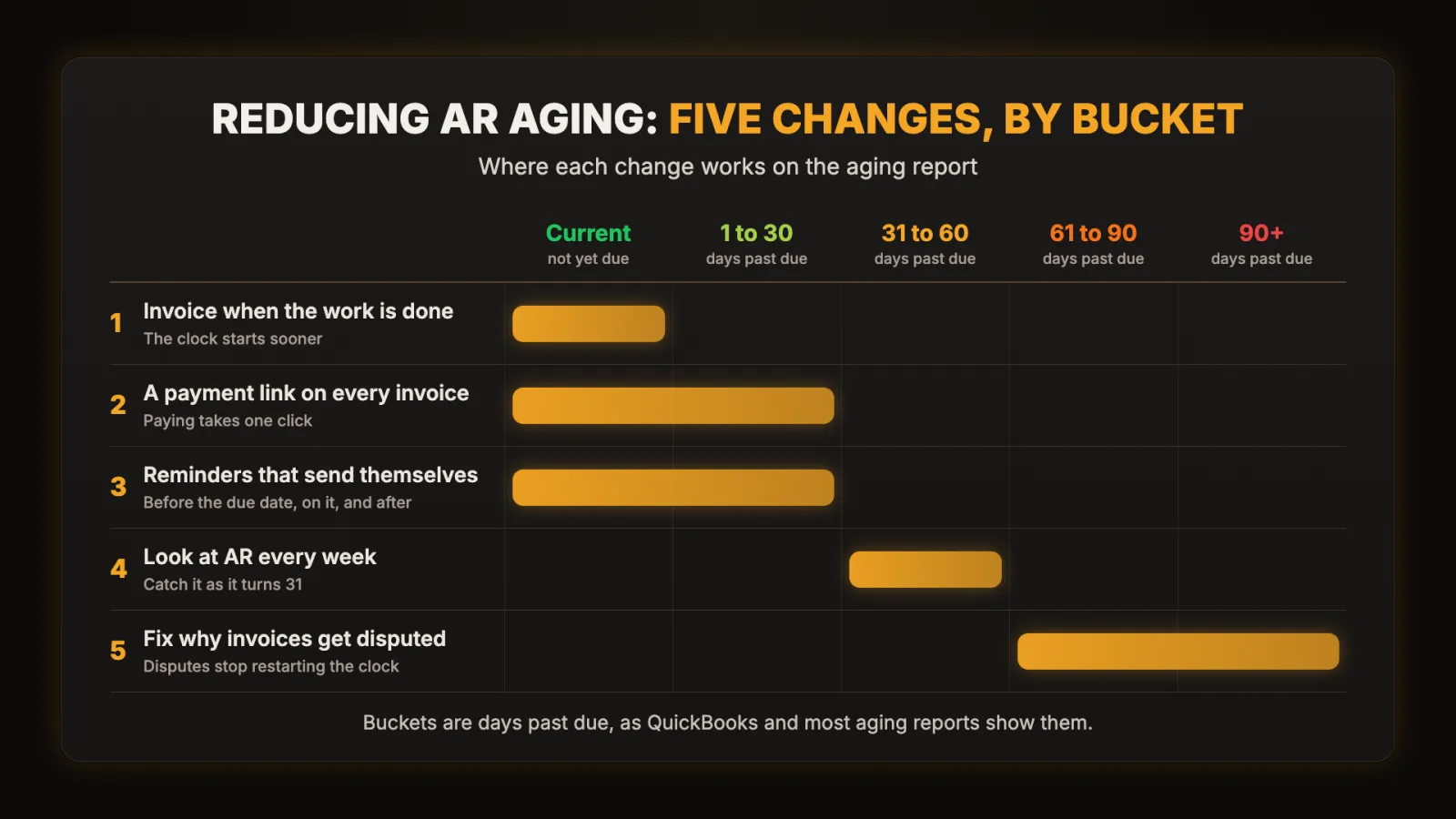
1. Send the invoice when the work is done
Connect the place where work gets marked complete (your job app, CRM or project board) to your invoicing tool, so finishing a job creates and sends the invoice. Nobody has to remember, and nobody re-types line items. This is the first of the five jobs we get hired for: getting the tools you already pay for to talk to each other.
2. Put a payment link on every invoice
QuickBooks, Stripe and Square all take card or bank payments straight from the invoice. Turn it on. Every step you remove between "I should pay this" and "paid" shortens the wait.
3. Let reminders send themselves
Set a schedule once and let it run, and have it stop the moment a payment lands so nobody gets chased for an invoice they already paid.
| When | What goes out | Tone |
|---|---|---|
| 3 days before the due date | A heads-up with the amount and the payment link | Friendly |
| On the due date | Due today, same link | Neutral |
| 7 days late | An overdue notice with the invoice attached | Direct |
| 21 days late | A personal email or call from the owner | Firm, and human |
4. Look at AR every week, not every month
A one-screen view of who owes what, sorted by age, takes the surprise out of month end. It can be a saved report in your accounting tool or a dashboard that pulls from it. What matters is that someone looks every week and acts on anything that just moved into the 31+ day bucket.
5. Fix the reasons invoices get disputed
If the same kind of invoice keeps coming back with questions (wrong rate, missing PO number, line items nobody recognizes), fix the template or the data feeding it. Every dispute restarts the clock.
What This Looked Like for One Client
LMS Entertainment, an event and entertainment company, was losing two to three hours a day chasing invoices and updating spreadsheets. We automated their billing pipeline so an invoice goes out the moment a job closes. In the words of Lisa, the owner: "Now invoices go out the second a job closes, and our AR aging dropped by 60% in the first month."
Nobody was hired, and nobody chased harder. The invoices simply stopped waiting. Read the full story, or see how the same problem looks in other event companies.
Put a Price on It First
Before you build anything, price the manual version. If someone spends 20 minutes on each invoice and you send 60 a month, that is 20 hours a month, or 240 hours a year, before counting reminders and corrections. Put your own numbers into the Manual Tax Calculator for a yearly dollar figure. If invoicing is one of several jobs competing for attention, rank them with the Automation Priority Scorer.
When Automation Is the Wrong Fix
If a handful of customers pay late no matter what you send, you have a terms or credit problem. Deposits, shorter terms or a different customer mix will do more than any reminder. And if you send five invoices a month, a calendar reminder and a payment link may be all you need.
Where do your invoices wait?
If cash is piling up in your 31+ day buckets, 30 minutes is usually enough to see where your invoices wait and what to fix first.
If a payment link and a reminder schedule will do it, we'll tell you that.
Book a Free Discovery Call