
What Should You Automate First? A Prioritization Framework
The Selection Problem
For most growing businesses without an operations team, "automation" cuts both ways. On one side is the promise of streamlined operations; on the other is a graveyard of half-finished Zapier integrations and expensive software that nobody uses. The usual mistake is choosing the wrong thing to automate first.
When you are drowning in manual processes and tool sprawl, every friction point feels like a priority. But treating every bottleneck as equally urgent is a recipe for operational gridlock. To scale, you need a framework that filters noise and identifies the highest-leverage opportunities for business process automation.
The Concept of Operational Debt
Before we dive into the math, we must address why your team is overwhelmed. Most businesses suffer from "Operational Debt." Like technical debt, this is the cost of choosing a "quick and dirty" manual workaround over a scalable system.
Over time, these workarounds compound. A founder manually BCCing a CRM, an ops manager copy-pasting data from a CSV into a slide deck, or a team lead manually assigning tickets: these are high-interest loans. You are paying for them daily with your team's most expensive asset: focus. Automation prioritization is simply the process of deciding which loans to pay off first to reclaim the most "interest."
The HAR Labs Scoring Matrix: (F × T × E)
We use a three-factor multiplication formula to calculate the Automation Priority Score (APS). We rank on a scale of 1–5. Multiplication is intentional; it aggressively highlights the outliers that are killing your productivity.
| Factor | Scores 1 | Scores 3 | Scores 5 |
|---|---|---|---|
| Frequency (F) | Quarterly or ad hoc (a yearly board deck) | Weekly (a Friday team report) | Daily or continuous (new leads, support tickets) |
| Time (T), per run | Under 5 minutes | 30 to 60 minutes | 3 hours or more |
| Error rate (E) | Low: errors are trivial and fix themselves | Moderate: errors cause delays or 30+ minutes of cleanup | Critical: errors lose revenue, break compliance or lose clients |
1. Frequency (F): The Volume Factor
Frequency measures how often a task recurs. High-frequency tasks are the best candidates for automation because even small time savings compound into massive gains.
2. Time (T): The Labor Factor
Time measures the active "hands-on-keyboard" duration required to complete a single instance of the task.
3. Error Rate (E): The Risk Factor
Error rate measures how often humans make mistakes in this process and the "blast radius" of those mistakes.
The Scoring Matrix in Action
To use this, list your top 10 most painful manual workflows. Score them 1–5 in each category, then multiply. Here are four common ones, scored.
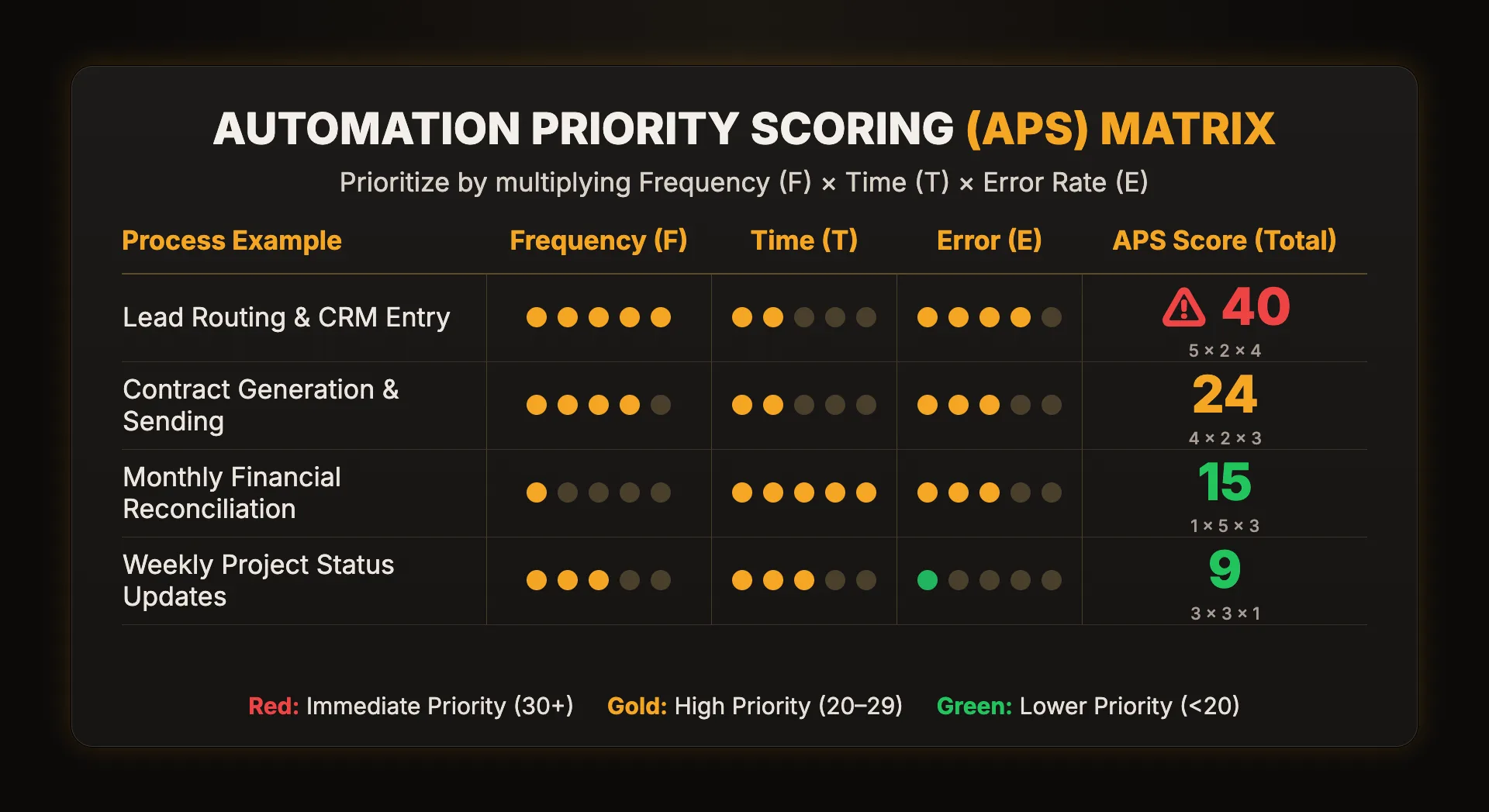
Worked Example: Why Lead Routing Wins
New leads arrive every day (Frequency: 5). Each one takes about 10 minutes to check, enter and assign (Time: 2, between the 5-minute and 30-minute marks). A lead entered wrong or assigned late is lost money (Error: 4). 5 × 2 × 4 = 40, which is in the 30+ band: automate it first. It gives the sales team a win every day.
Why Financial Reconciliation Waits
It is the "hardest" task on the list and takes 5 hours (Time: 5), but it only happens once a month (Frequency: 1). Even with a moderate error risk (Error: 3) it scores 1 × 5 × 3 = 15. Unless its errors are catastrophic, your time is better spent fixing the daily lead routing first.
The Trap of "Tool Sprawl" and Over-Engineering
A common mistake in operations consulting is trying to automate a broken process. If your process is a mess, automation just makes the mess happen faster.
Before applying the matrix, perform a "Process Sanity Check":
- Eliminate: Do we even need this task? If the report isn't being read, don't automate it. Kill it.
- Consolidate: Are we using three tools where one would suffice? Tool consolidation is often the most effective form of automation (how to run that audit).
- Standardize: Can we make the manual steps the same every time? You cannot automate a "vibes-based" process. It needs logic, triggers, and defined outputs.
High-Leverage Categories for Growing Businesses
If you are looking for where to start, these categories typically yield the highest APS scores:
Sales & Marketing Operations
- Lead Enrichment: Automatically pulling LinkedIn or Clearbit data into your CRM when a form is submitted.
- Speed-to-Lead: Instant Slack notifications for high-intent leads to decrease response time.
Customer Success & Onboarding
- Provisioning: Automatically creating accounts in your product, Slack, or project management tools once a contract is signed in DocuSign.
- Survey Loops: Triggering NPS or feedback requests 30 days after a client goes live.
Internal Operations & Finance
- Invoicing and collections: invoices sent when the job closes, and reminders that follow up on their own (how to reduce AR aging).
- Expense Management: Using OCR to scan receipts and map them to QuickBooks categories.
- Reporting Dashboards: Moving away from manual CSV exports toward live Looker or PowerBI syncs via Fivetran or Airbyte.
Technical Feasibility vs. Business Value
Once you have your APS score, you must filter it through Technical Feasibility.
- Low Feasibility: Requires custom API development, lacks "hooks," or involves highly subjective human judgment.
- High Feasibility: Uses standard integrators (Zapier, Make, Workato) and has a clear "If This, Then That" logic.
The Golden Rule: Choose the highest APS score that also has High Feasibility. This is your "Low-Hanging Fruit."
The score tells you what to fix first; it does not tell you what the fix is worth. For that, put your top candidate through the Manual Tax Calculator: runs per month, minutes per run, hourly rate and error rate. Those are the same three ingredients as F, T and E, expressed in dollars.
Immediate Action Plan: The 48-Hour Sprint
Don't wait for a quarterly planning session. You can identify and solve your first bottleneck in 48 hours:
- Hour 0–2: Distribute the F × T × E matrix to your team leads. Have them submit their top 3 "time-suck" tasks.
- Hour 2–4: Score the submissions. Identify the single task with the highest APS.
- Hour 4–24: Map the process on a whiteboard (or Miro). Identify the Trigger (e.g., "New Row in Google Sheets") and the Action (e.g., "Send Slack Message").
- Hour 24–48: Build a "Minimum Viable Automation" (MVA). Use a no-code tool to automate just the first two steps.
Free download · PDF, 2 pages
Ops Audit Checklist
The whole method on two printable pages: the F × T × E scoring table, the sanity check, a dollar-figure worksheet and the 48-hour sprint.
Scaling Beyond the First Win
AI automation is not a "set it and forget it" project. It is a core competency of a modern, efficient business. As you knock out the high-score tasks, you will find that your team's capacity expands. The people who were previously tethered to data entry are now free to focus on workflow automation strategy or high-level client service.
Stop letting tool sprawl and manual overhead dictate your growth. Use the matrix, find your 30+ tasks, and start reclaiming your operations. When you want to know what a fix is worth after tool and maintenance costs, read Automation ROI: What It Actually Looks Like. And if you are still deciding whether operations are your bottleneck at all, start with 5 Signs Your Operations Are Holding You Back.
Score your own processes
The Automation Priority Scorer runs this F × T × E method for you: list your processes, rate each one, and get them ranked.
Then price the winner with the Manual Tax Calculator before you build anything.
Open the scorer